Building Immersive Real Estate: Orchestrating Light, Camera, and UI in React Three Fiber
Building a 3D apartment tour using React Three Fiber (R3F) isn't just about loading a GLTF model into a canvas. It requires acting as a cinematographer, a lighting technician, and a UI designer all at once.
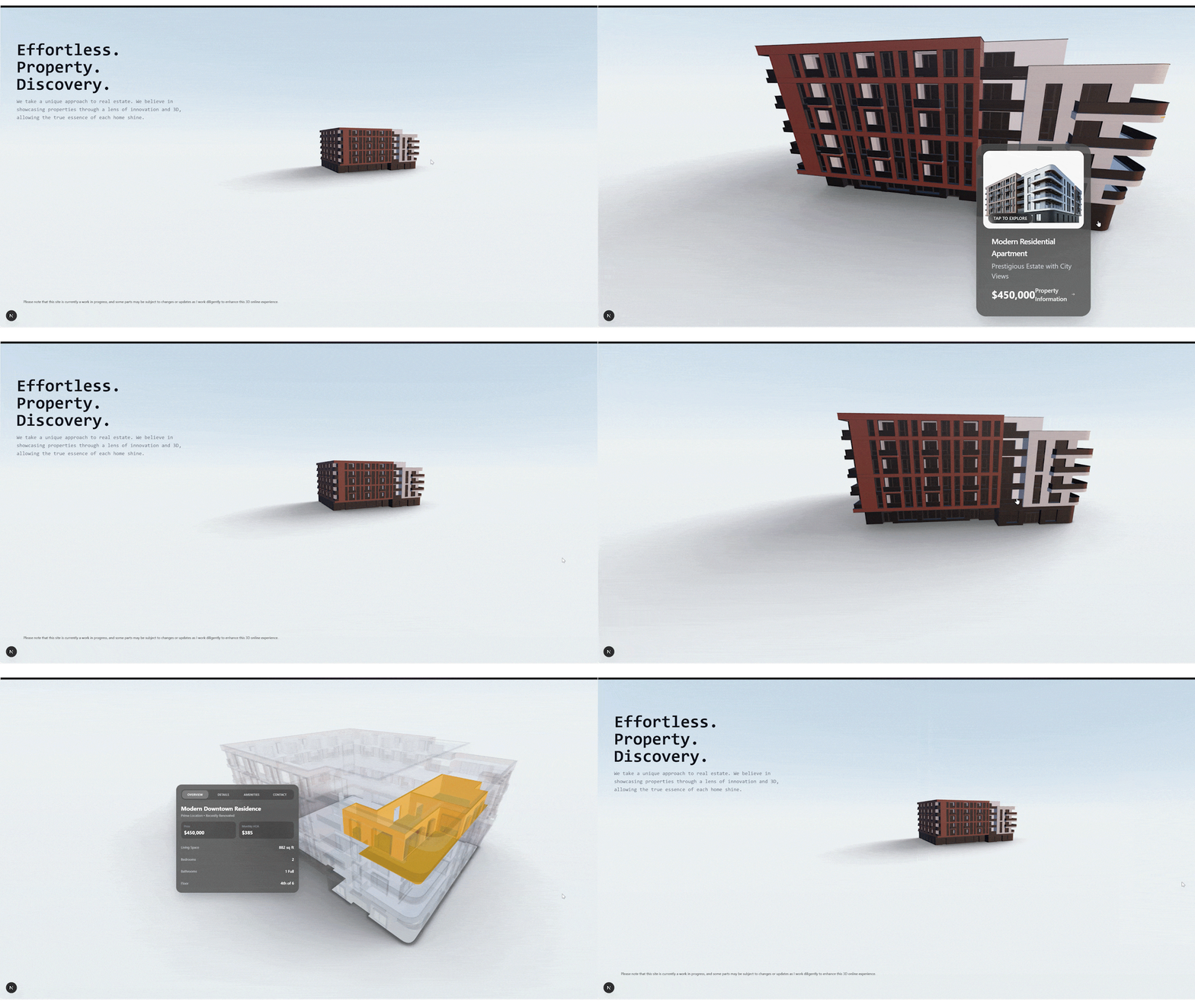
In the world of web development, the line between a "website" and an "experience" is becoming increasingly blurred. Nowhere is this more apparent than in real estate. Static image carousels are functional, but they lack the spatial storytelling required to truly sell a home.
Building a 3D apartment tour using React Three Fiber (R3F) isn't just about loading a GLTF model into a canvas. It requires acting as a cinematographer, a lighting technician, and a UI designer all at once.
Based on a recent deep dive into a production-grade R3F project, here is how we can orchestrate lighting, camera movement, and interface interaction to create a seamless spatial experience.
1. Setting the Stage: Lighting as a Foundation
The difference between a scene that looks like a prototype and one that feels "lived-in" usually comes down to lighting. In Experience.tsx, we move away from standard ambient lights and leverage the power of soft shadow accumulation.
Instead of relying on heavy, pre-baked lightmaps (which can bloat file sizes), we can use @react-three/drei's <AccumulativeShadows>:
<AccumulativeShadows frames={200} color="purple" colorBlend={0.5} opacity={0.6} scale={15}>
    <RandomizedLight amount={8} radius={5} ambient={0.5} position={[5, 2.5, -2]} bias={0.001}/>
</AccumulativeShadows>
Why this matters: This technique renders shadows over multiple frames. It "grounds" the apartment building, giving it weight and physical presence. Combined with an <Environment preset="sunset" /> and a dynamic <Sky /> component, the scene gains a warmth and atmosphere that static lighting simply cannot achieve. It tells the user: this is a real place.
2. The Director: Stateful Camera Orchestration
In a standard web page, the user controls the scroll. In a 3D experience, we often need to take the wheel to ensure the user sees the right details. However, seizing control of the camera can feel jarring if done poorly.
The solution found in apartmentComplex.tsx is to treat the camera as a state machine. Instead of imperatively snapping the camera to a new coordinate on click, we use lerp (Linear Interpolation) inside the useFrame loop.
When a user clicks the building to "Select to Zoom":
State Change: A target vector is updated (e.g., zooming in to [0.8, 1.6, 3.8]).
The Glide: Every frame, the camera travels 10% of the distance to that target.
The Result: A smooth, cinematic "dolly in" effect that feels fluid rather than mechanical.
This approach creates a "Director" entity within the code—logic that intelligently decides where the user should look, while maintaining a smooth transition that keeps them oriented in 3D space.
3. Bridging 2D and 3D: Context-Aware UI
One of the hardest challenges in WebGL is displaying readable, interactive text. Rendered 3D text is often hard to read, while standard HTML overlays can feel disconnected from the scene.
The approach in apartmentBuilding.tsx bridges this gap beautifully. It combines the <Html> component from Drei with Framer Motion to inject rich 2D interfaces directly into the 3D world.
The "X-Ray" Interaction is particularly clever:
Trigger: When the user clicks to view details.
3D Response: The building's material opacity drops to 0.05, turning the exterior into a "ghost" structure.
2D Response: A crisp, HTML-based "Sale Card" springs into view using motion.div.
This allows us to keep the context of the building (the 3D shape) while presenting high-fidelity data (price, amenities, contact forms) in a format users are comfortable interacting with. It renders the UI inside the scene, ensuring the pop-up moves and scales naturally as the camera adjusts.
Conclusion
Creating a 3D portfolio or product showcase is an exercise in balance. By investing in grounded lighting, smooth camera mathematics, and a thoughtful integration of 2D UI, we transform a simple 3D model into a narrative device.
The code in the threeFiber directory proves that the best 3D experiences aren't just about polygons—they are about how those polygons move, light up, and interact with the user.